!

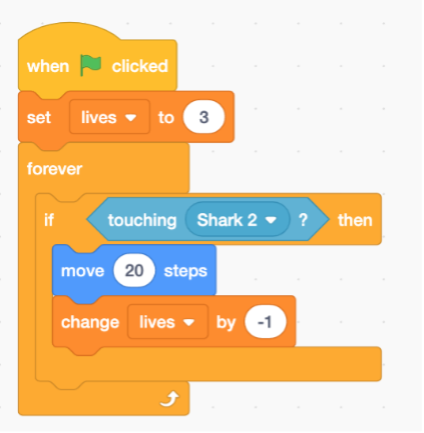
Work through Lesson 7 from the Scratch booklet.
Extension: begin working on your own game or animation
The following are key shortcuts for using DragonSlides and reveal.js.
| Key combination | Action |
|---|---|
| →, PAGE DOWN, SPACE | Next slide |
| ←, PAGE UP | Previous slide |
| SHIFT + → | Last Slide |
| SHIFT + ← | First slide |
| B | Whiteboard |
| W | Widget Board/White Screen |
| C | Toggle Notes Canvas |
| DEL | Clears Whiteboard/Notes Canvas |
| S | Show Presenter Mode |
| SHIFT + D | Toggle Dark Mode |
| H | Goes to the Home Slide |
| META + P | Show Print options window |
In order to use the 'Start Remote' feature, you'll need to download JB Slide Controls from the Apple App Store. Once you have this you'll be able to control the slides using the app from you Apple Watch.
DragonSlides and jamiebalfour.scot are copyright © Jamie B Balfour 2017 - 2024, 2010 - 2024. Content is copyright © Jamie B Balfour